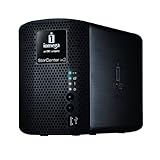
 Well let me start by saying this... it does everything it promises; but there is not a single thing you can say it does perfect ( good concept, bad execution). Every option its too limited. It lacks functionality on everything it is supposed to do, and Support sucks.Still a long way to go to compete with Drobo, it lacks a lot of development.
 Prior to purchasing this NAS I had an old Inspiron 6000 with XP as a "Home Server". It served files, Itunes, media, and along with 2GB memory and 2TB external Firewire disk I had speed and backup space. the only thing missing was Time Machine Support. I bought this Iomega to save on power, and because it was "So easy to use and convenient" according to all biased reviews I read.
Functionality:
A) Setup: Yes, it is easy to set up, But, the setup assistant doesn't work on a wireless network. your machine has to be wired to the routerin order to recognize the storecenter. Also this web interface is awful, sometimes you get a timeout or page not found (verified in forums with other users). Also to update the firmware you have to manually download it form Iomega site because the function that is supposed to check for and update always says "The device software is up to date" even thou there was a mandatory update on the site. Also, you can enable and disable most of the functions but there are no options in almost any of the functions so you have to use them "as they are configured by Iomega".
B) Backup: it does a fair job with the backups, but there is no option to limit the amount of space used by Time Machine. You can set a quota to every folder on the device but not to the time machine folder. And if you have 3 Macs and manage a lot of pictures and movies Time Machine Backups fill all the disk space in no time so you don't have space for the other files.
c) Torrents: it does download torrents, but, you have little control over the process. you can only add .torrents files from the custom Web interface (there is monitored folder for autoloading .torrents like all torrents managers), You cannot use Magnet links or any other form of links (except a direct internet link to the .torrent). You cannot Pause or Stop torrents if it is not done ONE BY ONE; everything has to be done One by One, not a good thing if you leech or serve a lot of torrents. The interface fails to delete completed torrents, and there is a known torrent delete bug (admitted in the Iomega forums by developers) that can render your NAS useless. No way to configure how many torrents are active at a time, so all torrets are active always, this means a lot of waiting time if you have a lot of torrents and you are waiting for the first one on line.
d) UPnP Server: It does scan all the disk for movies and media and makes the available in the net, You just have to enable the option and thats it.I dont know what UPnP version this Nas uses, but most of the times if you are watching a movie on the Xbox and a mac starts a time machine backup, movie just freezes and sometimes terminate without a reason. This does not happens to my old inspiron when watching a movie and carboncopy initiated a backup.Also if you use XBMC it does not handle the srt files for subtitles. Streaming its very slow, compared to other UPnP devices on the same network and using the same equipment. Fast Forward its unbearable. Good concept bad execution.
e) Itunes Server: It does serve (share) your itunes libraryover the Lan, but, even thou the manual instruct you to option-copy all the itunes folder to the music folder in the NAS, you don't get the Customs Playlist nor the default Itunes playlists. There are no Playlist at all. Everyhing appears on a big library on shared with your storage name (some basic distinction like Music and Movies and thats all). Again good concept bad execution.
f) Printers: havent used this feature.
g) File Server: It has a very nice configuration of local users and groups permissions. There is a bug that if you use another thing (like windows explorer or mac finder)except the web interface al file sizes reads 1MB, So you can only see file sizes of web interface. It does a great job in mounting the time machine disk and dismounting it even when you change the Nas ip, this is transparent to the OS and the user. SMB and Windows Share ARE SLOW... very Slow (tested on 2 windows machines and one Original Xbox using XBMC). Apple AFP is FAST very fast.
h) Iomega Storecenter Software: I havent used it in windows but its ok on the mac. The only thing is that every time you close the Safari Window it opens you have to click File>Open>Device and place your login information. Also It runs an script when the user logs on that tries to connect to all shares on the NAS... great concept if you are always at your house or where the device is, bad if you have to leave the location; you get a gazilion errors and disconnect warnings. Also if for some reason you put the computer to sleep and/or disconnect any of the shares accidentally on finder, running the script does not work. you have to logout and login. also if you hit help osX request your administrator password for some odd reason.
I) Speed, Temperature and Energy efficiency : This thing is slow, by default it has Raid mirror and write cache enabled but knowledge base says that if you have "Performance Problems" you should turn off "Write Caching" witch I did with no luck. I have turned off almost every non essential service and still sometimes this moves like a turtle. This thing is supposed to have 10/100/1000 card but i was unable to transfer 5GB in less than 20 Minutes (Have seen a lot of speed transfer reports on Iomega support Forum). The Nas is very hot so i wouldn't leave it somewhere without ventilation (have read reports of 400f temperatures on the forum). It is energy efficient, it consumes mere 60watt.
After covering almost all the features you can see what I meant at the beginning, this think its great in concept, but the execution its poor. Also support its very limited, the Knowledge base its small. In the forum every post its revised or redacted by Iomega Staff (supposedly "taking care of their Image" after some enraged customer spoke their minds) and I'm still waiting on a mail I sent a week ago asking for some "Feature clarification".
For me, I will jut use this thing for Time Machine although it would have been cheaper to just buy a 1Tb Time Capsule. All other services are better served with my old trusty XP Inspiron 6000.
******* UPDATE ********
After a week of use the unit started shutting down for heating issues. Contacted customer support and they instructed me to disassemble the unit myself and check that the FAN INSIDE the unit was not obstructed. After that told me to wait for a Level III representative call. I'm still waiting for the call.It seems that this heating issue is a very common issue on new units: [...]
Click Here to see more reviews about: Iomega StorCenter ix2-200 - 2 TB Network Attached Storage 34481 (Black)
Product Description:
The Iomega StorCenter ix2-200 Network Storage offers content sharing with advanced security, and is ideal for small and remote offices, workgroups or home networks. Based on enterprise-class EMC storage technology, the StorCenter ix2-200 provides easy file sharing, iSCSI block access, and multiple RAID configurations for optimized data protection. Business users will appreciate the robust data protection features such as UPS support, print serving, folder quotas, rsync device-to-device replication, and user replaceable drives for business continuity and disaster recovery. The easy-to-use interface provides no-hassle management. Active Directory support and remote access round out the comprehensive business features. The StorCenter ix2-200 supports up to five Axis IP security cameras for basic video surveillance. Home users benefit from the advanced media features such as DLNA certified UPnP AV Media Server, PTP (Picture Transfer Protocol), torrent download compatibility, Bluetooth upload, and Cooliris slide show plug-in. Award-winning EMC Retrospect Express backup software and RSA BSAFE encryption for protected installs and upgrades. Supports PC, Mac, and Linux clients and is VMware certified for NFS and iSCSI. Available in 1TB, 2TB, and 4TB capacities.
 Get 12% OFF
Want to buy Iomega StorCenter ix2-200 - 2 TB Network Attached Storage 34481 (Black) at other amazon sites? Click the corresponding icon below:


0 comments:
Post a Comment