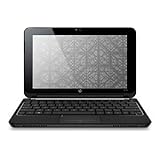
 I don't much believe in brand loyalty. I usually do a lot of research, using Consumer Reports, user reviews, expert viewpoints, and a particular brand's repair history in my decision to buy. But when it comes to "inexpensive" home computers, after using many brands over the past 25 years (Apple II+ anyone?), I've settled on HP, and I've been very happy with my HP desktops and laptops, until now.
I have owned the HP Mini 110-1030NR Netbook for the past seven months and wrote a rave review about it last year. I wanted to do the same for this HP Mini 210 HD, and I've been using it for about six weeks, hoping that I'll grow to like it but actually finding myself wanting to give it two stars. I gave it three because it's still a good computer, and the issues I have with it are mostly cosmetic and may not be a problem for others. Much of my review compares the HP Mini 210 to the HP Mini 110, since those are the only netbooks I have used.
I purchased the HD edition solely for the purpose of better resolution - fitting more on a tiny screen. I also liked the idea of the ventless bottom since I often use it on my lap and find laptop chill mats and fans to be an inconvenience. Since this was to function as my only laptop, I went all out, and my trusty 110 went to my very lucky daughter. Even though I like almost everything about the 110 better than the 210, she gets to keep the 110 due to its lower resolution.
Specs: HP Mini 210-1000 HD CTO, "black crystal" color
: self-upgraded to Windows 7 Home Premium
: self-upgraded to Crucial CT25664AC800 2GB 200-pin SODIMM DDR2 PC2-6400 Memory
: Intel Atom Processor N450 (1.66GHz, 512KB) with Intel Graphics Media Accelerator 3150
: 250GB 7200RPM SATA Hard Drive
: 10.1" diagonal HD LED HP BrightView Infinity Widescreen Display (1366 x 768)
: HP Mini Webcam
: Wireless-G Card with Bluetooth
: one 3-cell and one 6-cell Lithium Ion battery
: 40W AC adapter (the 110 has a 30W AC adapter)
In addition to the RAM upgrade, I devote an entire SanDisk 4GB Extreme III Class 10 SDHC card to Windows ReadyBoost and I find this to be very effective in keeping optimum system speeds.
Other customizable options include an upgraded N470 (1.83GHz, 512KB) processor, a wireless-N card, an embedded GPS module with HP Navigator software, integrated WWAN with GPS, or Broadcom Crystal HD Enhanced Video accelerator with ArcSoft TotalMedia Theatre.PROS:
-----
Worked right out of the box - easy setup, no pre-loaded junk, connects to WiFi and WWAN effortlessly
Beautiful screen for video when not drowned out by glossy reflective surface
Ability to play video and music and view picture library without booting the operating system
Upgraded running speed is fantastic and better than the same upgrades on the 110
Light-weight, sits easily in my lap, very portable
No vents on the bottom
Simple keyboard without a lot of confusing extra functions per key
3 USB ports
The 3-cell battery sits flush with the computer, keeping it nice and slim. The 6-cell sticks out, but not as much as it does on the 110, and that's never been a problem for me.
Improved power switch location, now on the right side and easier to access than on the front of the 110CONS:
-----
It goes without saying that there is no optical drive and no separate number pad, but just in case...
Does not feel as strong and study as the 110. The 210 seems to have a flimsier construction throughout.
I thought that no vents on the bottom meant that it would vent well out of the side vents. It does not. Venting definitely seems to be an HP liability. It burns up the bottom left side of the netbook. However, so far my system speed (with the upgrades) is still top notch.
The keyboard on the 110 is SO MUCH BETTER. The 210 has Chiclet-like keys, with large gaps in between that catch dirt particles quite easily. It has no Home or End keys. As noted above, I like the simplicity of the keyboard, but no Home or End keys? Seriously?
The Brightview Infinity screen. It was the only option. It's super GLOSSY, super reflective, super impossible to see in daylight. I sat in the sun and in the shade and played with the brightness settings, barely able to see the screen in either scenario. It's beautiful if you are in just the right light and are able to ignore the image of yourself staring back at you every time the background darkens just a bit. It also picks up fingerprints and dust particles like crazy. My 110 is not glossy and I wish I could have the same matte screen on my 210.
The touchpad. This is why I want to THROW IT OUT THE WINDOW! I've spent the past six weeks trying out the various Synaptics settings, yet it still frustrates the crap out of me. Others complained about the buttons on the 110 being on the sides instead of at the bottom of the touchpad, but I never had a problem with that and I miss the raised tactile buttons. With the 210, HP put the buttons back on the bottom where people seem to be more comfortable, but they also made them flush with the rest of the keypad. I click, I hear the button click down, it even makes the button on the screen appear as if I've pushed it, yet NOTHING HAPPENS. I have to press several times, EVERY TIME I want to select something. There seems to be this tiny little zone that actually works, that DOESN'T include the bottom edge where I naturally tend to click. With tap-to-click enabled, the cursor will jump all over the screen, and will constantly select items I've barely hovered over (and not tapped), yet rarely select anything that I am tapping-to-select intentionally. Changing sensitivity settings had no discernable effect. I don't always have a mousing surface - I often have to use the touchpad, and that sometimes makes the 210 something I dread using. I had no problem getting used to it on the 110, but the touchpad on the 210 is absolute garbage. To top it all off, the 210 touchpad surface shows ugly fingerprint marks while that of the 110 did not.
Synopsis: If you're looking for a beautiful netbook to stream video on, with a highly capable computer, then I can recommend this 210 HD. If you know that you will mostly be using a mouse with it, then I can recommend this 210 HD. If you need higher resolution in a 10.1" screen and there's nothing in the same range available, then I hesitantly recommend this 210 HD. If not, then I regretfully recommend you look elsewhere.
Click Here to see more reviews about: HP Mini 210 HD Edition with 250GB HD; 1GB Memory
Product Description:
HP Mini 210 HD Edition with 250GB 7200RPM SATA Hard Drive; 1GB DDR2 System Memory (1 Dimm); Genuine Windows 7 Starter 32-bit; silver crystal. Go mobile in style with our Mini 210 HD Edition small and packed with all the essentials for on the go. The smooth, edge-to-edge 10.1" diagonal HD display gives you a crystal-clear view of Web pages 1. Choose from four colors: silver, black, red, and blue.

Want to buy HP Mini 210 HD Edition with 250GB HD; 1GB Memory at other amazon sites? Click the corresponding icon below:


0 comments:
Post a Comment